


WP Importer
If you want to make a single buck using wordpress, you need to have this plugin at hand. Of all the little tools available within the WordPress community, this one is the most essential because it helps you build big sites in no time.
You wanna make a quick grand, you should be able to mash up a big local directory and sell to the nearest plastic surgeon. Let him now that he can get all the traffic for free instead of paying 25$ per click to Google. All the traffic from a 50,000 page site..
WP Importer sucks content out of almost every data base or spread sheet you can possibly access and merges your data into blog posts that you can publish quickly and in unlimited numbers. With WP Importer the number of your posts is only limited by the size of the data bases you can gain access to. And these databases you can recycle over and over again to produce ever more content.
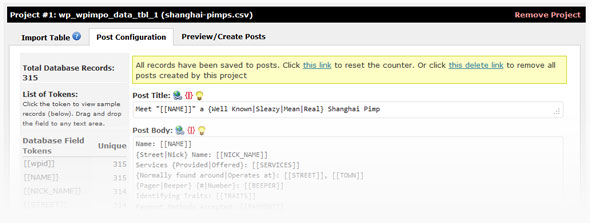
This implies everything saved in excel or SQL, everything tabulated with a .txt file extension or XML/RSS formatted feeds – almost every format that is commonly used to organize data lists.
The imported data gets converted into tokens, the number and content of which is defined by the number and content of data fields within the source. These tokens can be quickly organized in multiple groups and lay outs. You can easily create mash up sites on the fly incorporating images from Flickr, video from YouTube, Google Maps, content from RSS feeds and any user defined tokens.
WP Importer comes extremely handy to:
- Convert price lists into websites
- Create affiliate shops from affiliate feeds
- Build directories from address lists
- Create review sites from product lists
- Set up mad libs from your key word lists
You want to become the local guru in your SEO community, this is where you start to dump out web content in real bulk and create your luscious own net work starting with your own local market and consequentially just extend and grow into all neighboring niches.
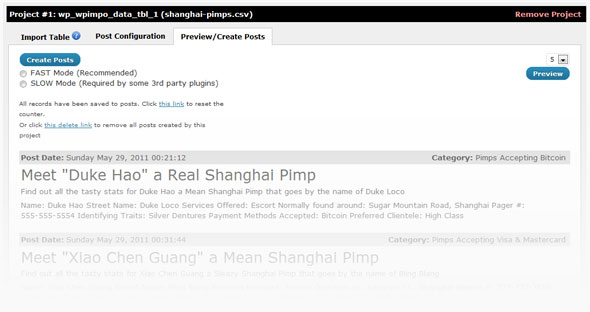
And if you ever want to cover:
- All pet shops in Oregon,
- Allrocket engine repair shops in Paris and
- All pimps in Shanghai
WP Importer will get your messages and your content over effortlessly and in no time.
IT’S FREE!
We give it to you free of charge because we want you to stay with us. Stay tuned and grow with us.
We want to become world’ s sleekest developer for hyper efficient Internet marketing tools. That is a long way to go. We start off giving the basics away for free. Once you have turned pro with our help, you’ll have made enough cash to pay for our core services.
To see how efficient our tools are, just download WP Importer. We developed WP Importer as a commercial grade application with free unencrypted code for personal customization. We use it everyday and had dismissed it long ago had we found any flaw. But there is none.
Learn More:


By matterdaddy July 17, 2011 - 7:06 pm
I am sorry but this is Just ROFL funny stuff
Name: Ho Yi
Nick Name: Fark Yi Ho
Services Provided: Transexuals
Normally found around: Juguang Rd., Shanghai
Pager Number: 777-777-7874
Identifying Traits: Yellow Sunglasses
Payment Methods Accepted: Food Stamps
Preferred Clientele: Blue Collar
OMG I checked out the sample site and just could not stop laughing.
By Donald Farmer July 25, 2011 - 5:15 am
I installed all your plugins so far and I must say this one is the best and most helpful for me. They all work well, but this one does the heaviest work from the whole bunch. I still have problems though to find more databases for my purposes. Would it be asking too much if you could supply a list of databases? I figure you must have something like this for your own purposes?
But thanks anyway. Others want payment for their products, you give it away for free.
Don
By admin July 25, 2011 - 6:12 am
Hi Don
You’re right, WP Importer is the HEAVY hitter from the bunch. Several hundreds of hours went into its development, all hours well spent in my book.
We do have a collection of databases we’ve used in house before. If anyone is interested in this they can create a support ticket at http://support.softwarp.com and I would be happy to supply copies. (use “Database links requested” as the subject)
This list includes things like baby names, song lyrics, car model specifications, airports around the world, pet shops, etc.
However when it comes to databases, there is no preset list of databases to ‘use’ with WP Importer. WP Importer can import & create sites from ANY database you acquire.
There are companies which sell databases ($1-several thousand).
There are databases available for free online
database scraping services are available
affiliate networks often provide databases for free
(I’ve personally built 100+ affiliate sites using free databases found within the Google affiliate network alone),
databases can be compiled from keyword lists, and so on.
With this latest version of WP Importer you can also import databases via RSS/XML feeds which starts to get real fun. Some drop shippers out there have feeds with hundreds of thousands of products in them just ripe for the picking.
The more unique the database, the better.
Finding the one which is best for you will be your own very personal quest. Happy hunting.
By Shane August 4, 2011 - 5:01 pm
I see you guys are giving this away free now, the version I paid for and have come to rely on for almost almost all my sites (up to around 20 large database sites) is already making me some nice money.
I was going to sign up for the mothership tester but do not have enough sites yet.. Any idea when this will be done, I will but it for sure.
I have found ways to make this plugin really work, the possibilities are endless.
By steve August 5, 2011 - 2:44 pm
Wow nice plugin. This one the important seem to be the best. Do you offer video presentation on how to use it effectively.
Please help.
thanks for the share.
By admin August 6, 2011 - 1:06 am
Hi Steve,
At the moment we only have the written tutorial, and step by step guide.
In the future we’ll try to produce some videos showing more into the strategy side of things & expand a bit more on the more advanced features of the plugin like the youtube/flickr/rss scrapping functionality.
Enjoy the plugin.
Ryan
By Eddie August 5, 2011 - 4:06 pm
This one is really amazes me :O
Btw, do you have database with niche about insurance / health?
Thanks
By admin August 6, 2011 - 1:24 am
Hi Eddie
There should be some medical and food related databases in there. I don’t remember anything about insurance. However I just did a quick search at and found these.
By roger August 5, 2011 - 8:49 pm
does WPImporter support the update of posts?
lets say, i have my 350 posts uploaded into wordpress(some are publised, and the rest are queued up to be posted, daily). Then i have some spun content created and i’ll just go add that to my csv file, go back to the post configuration tab ; edit that to take in the new token(s) and reupload, and update the existing posts, automagically.
By admin August 6, 2011 - 1:15 am
Hi Roger
WPImporter can update already generated posts with new information from specific tokens. These updates will effect both published & queued posts.
Tokens with an underscore at the beginning of their name will allow this to happen.
There’s a quick introduction to this feature on our tutorial.
Hope that helps.
By Beats Audio Software August 16, 2011 - 4:33 pm
Hi
I am trying to work out will the importer work for different affiliate networks
as I paid £50 for one and the guy says he is tweaking it and to be honest
it was a waste of money as it does not do what it was supposed to do and he is still
even selling the thing, I am after a great plugin which I can see this one is.
But affiliate networks let you download csv or xml and they are all different
and all need tweaking to get them imported and me for one can not get my head around
it all and am now stuck with a few sites with low content or disappearing content as one
is a coupon site and need to work it fast. Will it work ?
By admin August 17, 2011 - 5:46 am
Hey there, to answer your question “will it work?” i would first have to understand the problem. Unfortunately i can’t, would you mind re-wording it?
By aric August 18, 2011 - 2:47 am
I am so impressed by your free plugins and superb support! You guys Rock!
My datafeed comes from a password protected website, and I have the user name and password. Can your plugin deal with datafeed website directly ? Or do I have to first login and download the datafeed by myself ?
If the datafeed is updated, will it be a easy job to update all the post?
Thanks for your time in advance!
By admin August 18, 2011 - 9:48 am
Thanks Aric
If the feed “itself” is protected by a username and password, then you will need to download it first.
Unless of course, the user/pass can be entered directly into the feeds URL string. Then you can import server to server.
You’ll need to re-run the process to apply the updates to the feed.
You can create custom tokens whose content can be automatically updated without needing to re-import the database. Details on that can be found in our tutorial.
By Aric September 3, 2011 - 9:06 pm
Free text tokens doesn’t work! I tried many different ways to entry HTML or text, it can’t be saved and the box always shows “undefined”.
By admin November 3, 2011 - 7:05 am
Hello Aric..
The free text issue was resolved with version 4.1:
Please upgrade the plugin and give her another go
Cheers!
By Josh September 23, 2011 - 2:17 am
I am trying to get this plugin working and all seems well until I publish a post. The post shows only the tokens instead of their values like so:
[[TITLE]]
[[DESCRIPTION]]
[[IMAGE]]
What could be causing this?
By admin September 25, 2011 - 2:02 am
Hi Joshua
Sounds like an odd problem, open a support ticket at http://support.softwarp.com and we’ll take a closer look for you.
By raiderhost October 19, 2011 - 6:28 pm
i get some problem like Josh, we can view Database Field Tokens, but no record we get
when i try with your sample, all record successfull to be import. Where this problem ??
thankz
By Kriz October 19, 2011 - 1:36 am
Thanks alot! This is what i was looking for
By ian October 26, 2011 - 7:05 pm
Really awesome tool. One weird bug I’m hitting…
I can import databses fine, but the spun text isn’t working. Tokens are fine, but when I try to use spun text, I end up with {stuff like this|junk like this} getting pushed to my published posts.
Any ideas?
Thanks!
By ian October 26, 2011 - 11:40 pm
Nevermind – I’m an idiot and didn’t have wp spin engine activated. feel free to delete these comments.
Thanks again for the awesome tools
By admin November 1, 2011 - 7:17 am
Hi Ian
Glad you found it
Should you ever need support in the future, please create a ticket at our support desk. My guys can provide much quicker support through there.
best regards
Ryan
By Paul Jacob November 16, 2011 - 7:08 pm
What’s the best way to monetize a database blog?
By admin November 18, 2011 - 1:45 am
“Best way’s” could be debated for years. Depends on niche, country, site style, marketing hooks available, how much the site means to you, black hat, white hat, pink hat, list goes on for days.
But one of the simplest ways would be just to milk them for their traffic. Automatically fling visitors to the mega site over to landing pages (on other domains for example) which you’ve proven to convert well.
While of course milking them of their back-linking power to boost your money sites further up in the serps.
By Paul Jacob November 20, 2011 - 2:04 am
Thanks admin for your suggestions. I will certainly use the redirect to landing pages. However, I still want to monetize the DB posts themselves, so which is better to use Adsense or CPA, or can I use both? TIA for your input.
By admin November 23, 2011 - 1:50 am
Hi Paul
If your wanting human visitors to actually see the pages instead of redirecting them, then you’ll want to test a number of offers to see which ones bring you the most cash. Test offers, test locations & test designs. The only sure fire rule in monetizing a site is to throw out all assumptions and let the numbers do the talking. Numbers don’t lie, well not on their own that is.
By Paul November 28, 2011 - 1:43 am
Thanks Admin for your reply. Yes, I must never forget to test, test, test!
By Paul Jacob November 20, 2011 - 6:50 pm
Milk them for traffic. Great tip, thanks admin.
By Shawn November 30, 2011 - 10:36 pm
Can you give an example of how I would display RSS results in the post body? If I make a free text user-defined token as you demonstrate in your tutorial and grab the RSS of some Google results, how could I use that in a post?
By admin December 8, 2011 - 10:35 am
Sure no prob Shawn.
I just spit out a quik n dirty splog for ya to help get the ideas turning.
This splog used only the “traits” from our shanghai pimps demo database.
Using the user defined tokens I’ve grabbed an image from flickr, some text from a yahoo search rss feed, a video off youtube, and some google news, then mashed the results into single posts per phrase found in the pimps database.
Here’s an example of one of the RSS urls i used within the token
blog.search.yahoo.com/rss?ei=UTF-8&p=[[TRAITS]][[TRAITS]]gets replaced with a single record from the database for each post generated.To build something more elegant, i would use WP Spin Engine to spin in variable layouts, use all the database tokens, etc.
I kept this one super simple just so you could see how only a list of keywords can be turned into sites pretty quickly using WP Importer.
BTW, we’re on V4.5 now, so grab yourself the update from the download link above
Cheers
Ryan
By Paul Jacob December 13, 2011 - 12:28 am
Thanks Ryans for the splog. Is it possible to show the splog back end as you did in the step-by-step tutorial — no commenting just screen shots, so we can follow by example. What might seem a simple, no-brainer splog is serious work for a mashup newbie. I’m even willing to pay $10 (and I’m sure many would too) for a short video tutorial on how to use WP importer, show how the Shanghai pimp site and the splog were built.
By admin December 16, 2011 - 7:13 am
Sure no problem. Here is a backside peek into the quik n dirty splog demo’s config. I’ve included an expanded view of each user defined token’s settings.
Hope that helps.
By paul Jacob December 16, 2011 - 7:08 pm
Admin, what can I say: you’re the Man, the Myth, the Legend. Thank you very much, really appreciate your kindness.
By Shawn December 15, 2011 - 10:53 pm
Thanks Ryan – got it working now. In fact I just converted one of my sites over to use your plugin. Two more questions: 1) will there ever be an option to combine two databases? 2) Can you add the option to duplicate a Project (including the post template, etc)?
This is a really great plugin – those are just a couple of features I thought of that might be useful.
By admin December 16, 2011 - 5:24 am
Hi Shawn,
You can build posts from multiple databases on the same site via separate projects, however you can not merge data from multiple databases into a single post.
If you wanted to merge multiple databases into single posts i would suggest doing this manually first, then importing the output into WP Importer.
This way you ensure the relationship’s between the data of the separate databases is to your liking. Otherwise the outcome would be pretty difficult to work with.
We’ll add a “duplicate project” function in a future release. Thanks for the suggestion.
Cheers
Ryan
By Paul Jacob December 7, 2011 - 5:12 pm
I intend to create several directories inside one domain. Please advise which is better to use for SEO: sub-domains like “directory.domain.com” or sub-folders like “domain.com/directory, or maybe folders inside sub-domains. TIA for your input.
By admin December 8, 2011 - 12:07 am
Hi Paul
I would use sub domains.
By Paul Jacob December 13, 2011 - 5:25 am
How to update WP Importer? Do I just upload it to the WP plugins and it would update itself?
By admin December 16, 2011 - 5:28 am
You can use FTP to upload the new files and replace the old files. Or you can use WP File Juggler if you don’t want to fiddle with ftp.
By Deborah December 16, 2011 - 1:28 am
Hi,
You guys have an amazing site! I’m a newbie and thought I’d try out your plugins. I installed the wp importer and wp spin engine successfully but, when I tried to import your database – the shanghai pimps – I get a message “sorry, this file type is not permitted for security reasons.”
Is there anyway I can get around this or am I doing something wrong?
thank you!
By admin December 16, 2011 - 5:16 am
Hi Deborah,
Thanks for the compliment.
Regarding the error you received during import, please make certain to unzip the file first and only upload the database held within, not the .zip file itself.
Should you have any further troubles feel free to open a support ticket and we’ll help you out.
Cheers
Ryan
By paul Jacob December 16, 2011 - 7:24 pm
Dear Mothership Commanders:
Thanks to Ryan, Admin, and all the rest of the Commanders for Softwarp and everything in it.
The first time I read the grey-colored blurb on top of the WP-importer page, I became fascinated, but also intimidated by it. This is the blurb:
“You wanna make a quick grand, just mash up a big local directory and sell to the nearest plastic surgeon. Let him now that he can get all the traffic for free instead of paying 25$ per click to Google. All the traffic from a 50,000 page site…”
Yes, I do want to make a quick grand, but I have no clue what a mashup site for a surgeon, or any other professional should look like. And this is what I hope you’d do for me and others who might have the same lingering need: please create a quick mashup site for the above mentioned surgeon. Let it be as small as the splog you created, but the most important thing I want to learn is the process/technique of bringing various resources together for the mashup directory. Once I see what you have in mind, I will be able to replicate the process easily. And please make ONE screen capture of the backend so I can see how you put it together.
I’m currently a master of the Shanghai pimp style directory, but here in Phoenix, we have few pimps, but many plastic surgeons (wish it were the other way around ). I thank you in advance for your kind help.
By admin December 30, 2011 - 5:34 am
Hi Paul
Thanks for the heartfelt comment.
Indeed that quote may have generated the wrong impression we were giving “income guarantees”, therefore we modified the text.
However we still firmly stand by the claim that under the current market condition and with adequate use of this module, users indeed can easily make a grand.
We intend to publish a series of strategy related material for the Mothership platform in the near future that most likely will help you out.
In the meantime let me congratulate you for mastering the shanghai pimp style directory. Now try for a bit of abstraction & you will see how you can expand that same approach to building something a tad more engaging for the purpose of flipping. And may Phoenix finally rise from the ashes.
By Paul Jacob January 2, 2012 - 4:34 pm
Thank you admin, and please accept my best wishes for a happy, healthy, prosperous, and dynamic 2012.
By De v January 8, 2012 - 6:50 am
Well, was hopeful of using an xml feed as it is mentioned compatible above. But after installing, it clearly states rss only.
Really wanted this to be a different way to pull an unformatted xml (api) into WP so that it can be formatted to rss. Any advice?
With thanks.
By admin January 13, 2012 - 4:19 am
Hi De v,
Actually it imports a variety of formats & XML is one of them. We chose to keep the alphabet soup of possible extension letters off the user interface.
I can import from the the following .xml files problem free.
http://www.medicalnewstoday.com/rss/backpain.xml
http://feeds.feedburner.com/mnt/healthnews?format=xml
You should be able to import from your xml as well, if not feel free to send us the url via a support ticket and we’ll take a closer look for you. Maybe the feed is protected behind a user/pass, requires additional input to render, or only renders to particular user-agents for example.
Best regards
By Sallie Goetsch (rhymes with 'sketch') January 12, 2012 - 1:45 am
I just installed this on a dev site on a local server to see whether it would work, and when I entered an e-mail address for the unlock code, I got an error saying “Fatal error: Call to undefined function curl_init() in /var/www/bacndev/import/wp-content/plugins/wp-importer/importer.php on line 252.” I suspect this has something to do with my LAMP server settings. Is there another way to get an unlock code?
By admin January 12, 2012 - 8:31 am
Hi Sallie,
We can provide the unlock code to you via email outside the usual unlock flow, however the following process will require CURL again and cause
So you’ll need to have curl module ON within your LAMP server settings, then all should run smoothly
If you have any further troubles create a support ticket and we’ll lend a hand.
Thanks for stopping by.
By RC February 19, 2012 - 8:33 am
Hey Ryan,
Spent a year here one day reviewing your goodies!
Definitely can identify and can see why Bali is a choice.
Anyways, forms on the pages need a look at.
Your subscriptions via your site might be declining since
the error reads —-> The application cannot proceed!
An internal error occured. Please contact your administrator and describe the steps you took before you encounter this error message.
Error msg: Unable to connect to the database. Please make sure the database information specified in admin/includes/config.php are correct.
_________________________________________________
When you get this or ‘if” you get this, add me to the motherload waiting
to board the mothership.
Does the mothership get cable or satellite?
Thanks
By admin February 24, 2012 - 11:40 am
Hey RC,
Thanks for letting us know.
The server we host our subscription manager on went down for a bit.
Motherships doors are open.
Grab a free month and see how she handles for yourself.
Cheers
Ryan
By Ekgrin April 2, 2012 - 4:36 am
Hi,
I am a heavy user of your importer plugin. I have to import hundreds of feeds into WordPress with identical structure and posting setup. Now importing one feed at a time is fine, but copying the post creating setting from one tested project to a new one is PITA. If you can incorporate a “COPY BUTTON” to automatically copy post creating setting from any of the existing projects it would be wonderful and save a lots of time. Secondly, if you can create some mechanism to update existing posts created with your plugin with updated feeds would be really wonderful.
Your efforts in improving the plugin is quite appreciated.
By Ekgrin April 2, 2012 - 4:38 am
Any chance of Importing pipe delimited feeds in the next update?
By Salley Burden April 3, 2012 - 8:27 am
kindly send me some secrets tips
By Balu April 30, 2012 - 2:52 am
Really I love this plugins, thank you so much. i am a grate fan of your plugins.
I appreciate your work and you.
By Romil January 8, 2013 - 3:50 am
Hi,
I just installed the plugin and it required my email for the unlock code,.. unfortunately, until now, i still haven’t received any email regarding the unlock code,..
Anyone who can help?
Thanks!