


WP LiveStats
WP-LiveStats is another fundamental tool from our collection of free web marketing plug ins. Nobody in this business can exist without instantaneous analysis, and so can’t you.
Catch traffic spikes as they happen!
Just install it and be informed forever. WP LiveStats shows you in real time
• who is on your sites,
• who is active
• the visitor’s name
• what they are clicking,
• from where they originally arrived,
• for how long they are staying,
• which key phrases they entered into what SE and
• complete comment counts
In one word, everything you really need to know you get at a glance right in your header. That makes for full information coverage of your site from wherever you are within your WP Dashboard. As an additional benefit WP LiveStats shows you all the bots crawling through your site.
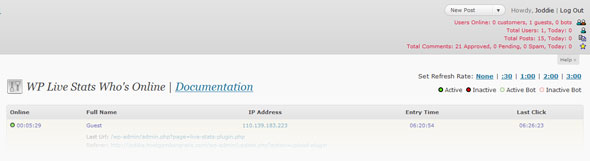
If you spot a SE in the referrer link, you can click on it and WP-LiveStats will show you the exact search results that your visitor got. It is a smart thing to review these SERP’s to analyze the quality of your listings.
It’s a must have!


By bert-s July 19, 2011 - 6:36 pm
I found someone talking about my site on a forum using this plugin. several unique ips coming from the same referring site.
I made an account at that forum and egged on the discussion. Result, one accusation of being a troll (oh no!), 217 unique visitors from that forum thread, 11 leads and 6 sales. I’m happy.
would be nice if the plugin could notify you of all traffic arriving from forums. Maybe next update?
By admin July 22, 2011 - 6:12 pm
Hey Bert-S,
Glad to hear we helped you land 6 new sales.
Stay tuned for WP-Mothership.
It provides a neat approach to your feature request.
Cheers
Ryan
By Brian July 23, 2011 - 9:39 am
Just goes to show who much you can improve with the right plugins and a close look at what they actually were made for. Just guys just brought my attention back to fact that I did spent way too much time on creation of sites and not enough at looking they really perform.
Your plugins really are cool and help me very much in getting better conversions.
Thanks a lot
Brian
By STEVE August 8, 2011 - 11:12 am
just removed statpress from some of my sites as it was increasing load times by up to 9 seconds. Will try this anyway but how is it for effecting site loading/performance?
By admin August 8, 2011 - 11:50 am
Hi Steve,
I haven’t seen any notable performance issues with using wp live stats, its a pretty straightforward and lightweight plugin. But if you do find any performances losses stop back buy and let us know.
By Martin November 10, 2011 - 8:04 am
My Menus setting page is not displaying live stats properly. Instead of at the top right hand corner, it finds comfort just below Screen Options & Help tab. The rest of the wp menu pages are OK.
Anyone with the same issue?
By BM November 12, 2011 - 3:21 am
I have installed this plugin and received my ulock code, but when I try to add the code I get this “Please make sure this plugin directory writeable!”
Can you please tell me what I have to do.. Sorry Im pretty much a noob at all this.
Thanks for your time.
By admin November 15, 2011 - 6:01 am
Hi BM,
Nip on over to our support desk and one of my guys will walk you through the process.
Cheers
Ryan