


WP Nibbler
WP Nibbler introduces you into the wonderful world of the Internet marketer’s deadly sins. It’s all about gluttony. If you want to be modest, it allows you to just nibble. But we don’t limit you, so feel free to gorge where you really can have your fill: at Yahoo Answer, one of world’s largest databases for text content.
Fatten your sites up with lively content
Nothing fills your spam sites quicker with highly variable content that floods the SERPs. With a little cron job, it becomes auto updating – unlimited content spawning at your fingertips. There’s no sweeter sin for auto-bloggers than WP Nibbler.
Unlike other sins WP-Nibbler comes free and requires no later repentance.
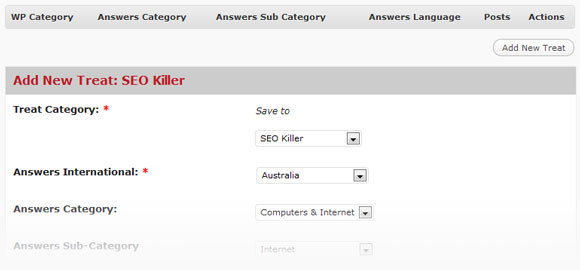
WP Nibbler is so simple to use we hardly dare to explain it:
- On the main page click “add new treat”.
- Select a category to save to.
- Select countries/regions/languages from the scroll down menu.
- Select answers category from the scroll down menu.
- Select answers sub-category from the scroll down menu.
- Enter your keywords
- Set the maximum number for questions to run per post.
- As a default each post comes with a yahoo answer banner. You may deselect at will.
- Save or save and start action.
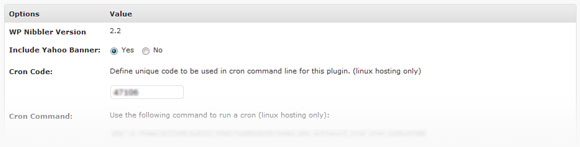
To increase efficiency and get auto update, you want to include a cron job. We have one preset for you ready to use. In case it should conflict with other plugins, you can redefine it.
Once WP Nibbler is running, Yahoo questions become posts and Yahoo answers become comments. The good thing here is that frequently changing comments make your sites appear more active for all visitors.
So that is the master benefit of WP-Nibbler. It adds social proof to you site: visitors tend to stay longer and instill more trust where they find a large number of lively comments. This highly increased stickiness even works for SE’s – a cool and simple technique to better results.
Five minutes of clicking revived a dead site into something worth having!
Six months ago I built a website on baby names with WP Importer. To spice it up I nibbled a bit on Yahoos Answers to baby names and activated the result in a “Recent Comments” side bar widget. It just took a second and the site looked so much cooler. Why was that? The site suddenly was teeming with life.
We at least expected a measurable benefit, but as a matter of fact only one month later the ratio between numeric visitors and real life human commentator’s had improved by massive 320%. Conversion on our newsletter subscriber box jumped up 89.7%.
So you want to have it, too?
It’s free!


By Sheryl July 17, 2011 - 2:51 pm
You’re quite funny here, right? And I really fun with the plugin. Or rather: fun at seeing how good this works in real life. I am running a couple of local campaigns in and around Calgary and the Nibbler saved me quite a lot of time. You certainly are on the right track here.
Thanks
Sheryl
By jubo August 1, 2011 - 6:41 pm
this looks good, I’m going to download it now. i hope it doesn’t conflict with anything else? Anyone had any problems? Thank you for the information, I’ll bookmark you and come back.
By admin August 4, 2011 - 8:50 am
Hi Jubo
No known conflicts yet, but should you encounter any let us know and we’ll work through them.
By Shane August 4, 2011 - 5:13 pm
Are there any instructions or videos for this plugin?
By jack August 9, 2011 - 2:56 pm
can i type in blank in keyword section?
By admin August 10, 2011 - 12:00 pm
Hi Jack
You’ll get better results by providing something in the keyword field.
If your after a super wide range of results, just enter a letter.
For example “A”. A huge variety of results will be returned like this.
Enjoy
Ryan
By Eng Hwa Heng @ Mahmod August 21, 2011 - 2:39 pm
tried this plugin but not working any troubleshooting tips
By admin August 26, 2011 - 2:06 am
Hi there
Please describe the error your experiencing over at our support desk and we will get you fixed up. Your comment here does not contain enough information for me to troubleshoot.
By Mad maaaaaan August 28, 2011 - 12:45 am
Hello,
Great plugins dude! Anyway is it possible to get the spinner to change nippler?
By keith davies September 4, 2011 - 2:09 pm
Hi i am using this but it doesn`t seem to post i have everything set up even a cron job but it is not posting please advise
By admin October 13, 2011 - 7:07 am
Hello Keith, sounds off. Can you create support ticket at http://support.softwarp.com and we’ll take a closer look for you.
By turoc October 27, 2011 - 9:56 pm
why can we not set the post date and time to be the current server date and time? Is there a specific reason? If not, can you perhaps add that as a feature?
By admin November 3, 2011 - 6:59 am
Hello Turoc,
thanks for the tip, will do for future release.
By duncan October 28, 2011 - 4:46 pm
first time I tried to run nibbler I got this message now I cant find my blog access denied WHat happened
Warning: require_once(/home/dunks411/dafreshseo.com/wp-config.php) [function.require-once]: failed to open stream: Permission denied in /home/dunks411/dafreshseo.com/wp-load.php on line 29
Fatal error: require_once() [function.require]: Failed opening required ‘/home/dunks411/dafreshseo.com/wp-config.php’ (include_path=’.:/usr/local/lib/php:/usr/local/php5/lib/pear’) in /home/dunks411/dafreshseo.com/wp-load.php on line 29
By admin November 3, 2011 - 7:02 am
Hello Duncan,
From the error message, the problem is wordpress has failed to locate wp-config.php file.
to make sure is the issue not caused by our plugin, please rename the plugin folder or even remove it completely, access wp-admin and see if the issue still arises. If it does, then the issue lays with something else on your site. If that fixes it, then please open a support ticket and we will take a closer look for you.