


WP SlideUp
Place your banners in a way that they actually catch the eye. Let your ads rise to the occasion where you want them and when you want them.
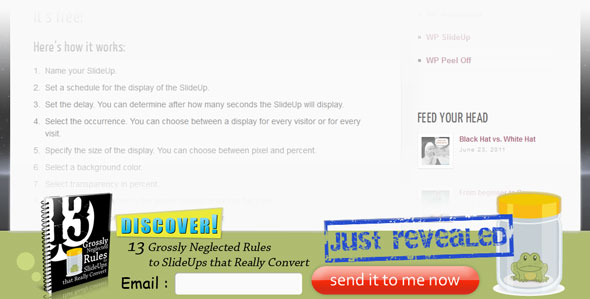
WP-SlideUp is a standard plugin to smoothly slide ad space in and out on the bottom of every type of page. When you have several ads it will randomly rotate them. WP-SlideUp also features integrated statistics to show you the number of visitors and the number of visitors who actually clicked on your ads so as to show you the conversion rate. At a glance you can see what’s pumping and what’s worth dumping.
It’s free!
Here’s how it works:
- Name your SlideUp.
- Set a schedule for the display of the SlideUp.
- Set the delay. You can determine after how many seconds the SlideUp will display.
- Select the occurrence. You can choose between a display for every visitor or for every visit.
- Specify the size of the display. You can choose between pixel and percent.
- Select a background color.
- Select transparency in percent.
- Set redirect if you want to the whole SlideUp area into be a link.
- Specify SlideUp content. You have two options here:
- You can either enter a URL for your content – image, form or whole site. Whatever you enter here will slide up. (cookie stuffers like that, but be aware of legal implications!)
- Alternatively, you can write html/javascript/css code for your content into the larger text area.
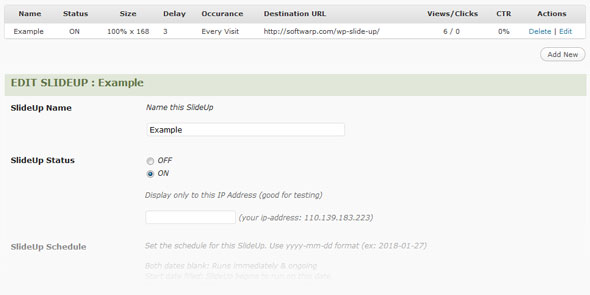
You can assign slide ups to display only on selected posts/pages. Just as you have different t-shirts for different occasions, for best conversion rates you have to display different slide-ups on different posts/pages. Let us immediately make clear why this feature makes all the difference.
WP SlideUp enhances your ads with elegant movement. This movement combined with well-matched messages directly translates into higher conversion rates.
Imagine reading an article about the challenges of designing WordPress themes. It talks about manually slicing up PSD files to create WP elements, proper syntax, design pitfalls and browser compatibility.
An ad for one year of web hosting for 9.99$ slides up. You might click it. It’s related. But would you not rather click, when the same article up-slides a form to instantly download a software that can automatically convert psd files into WP themes in 90 seconds?
Trying to anticipate your customer’s cravings before they even now they have them is a surefire way to phenomenal conversion rates. Elegant SlideUps affect your bank account.
Have them for free!


By Paul July 23, 2011 - 4:10 am
Great plugin guys, impressed your giving it away for free. Have you tried uploading this to the word-press repository? I bet it would become one of top downloads for the week.
By admin July 25, 2011 - 5:00 am
Hi Paul
We haven’t distributed anything via wordpress.org yet, but we do plan to in the future.
Glad to hear you like the plugin.
By Cerita Hantu July 23, 2011 - 11:23 am
I’m using this on my site. Banner send traffic to signup form. I now see increase on volume of emails collected each day from simple design of banner. Thanks soft warp.
By Kevin July 23, 2011 - 9:30 pm
Hey you guys, thanks a lot for the “neglected rules.” Actually I found it interesting to see everything in there was something one could figure out with a little experience – but who really ever does? So it’s quite helpful to see it on balck and white.
And I love the Slideup. Makes my work more fun.
Kevin
By Jeffrey Kang July 24, 2011 - 11:33 am
Can we see an example of a slideup? Is it what we’re seeing at the bottom of the screen right now?
By admin July 25, 2011 - 3:49 am
Yes, the slideup you see at the bottom is in fact being delivered by WP Slideup. This is a classic example of sliding up a “form”. You can also slide up static graphics, full webpages, flash content, etc. We are trying our best to supply more educational material for all our plugins. In the future we plan to have a portfolio of slideup ideas which users can swipe at will. Thanks for stopping by.
By Evan July 31, 2011 - 7:32 pm
Hey guys,
Awesome plugin. One question- how do we do a slideup form instead of just a banner? Do we just paste our form code into the slideup contents box?
Cheers,
Evan
By admin August 4, 2011 - 9:04 am
Hey Evan
there’s two methods you can slideup a form.
1. You can directly insert a link to the slideup contents “URL” text field (this is what i am doing here on this page, i’m sliding up the form found at http://softwarp.com/slideup/index.html)
2. You can paste in your HTML into the slideup contents “contents” text area
Hope that helps, should you need further assistance feel free to open a support ticket.
By Wes July 31, 2011 - 11:05 pm
Where’s the plugin available for download?
By Wes August 1, 2011 - 4:09 pm
I see the link now.
By Joey August 4, 2011 - 12:44 am
…I’m not sure what this is. A slideup plugin? Neat. What the hell is a slideup? Makes me nervous that you aren’t distributing via the WP community. Especially since it’s free. What kind of shady things are you doing?
By admin August 7, 2011 - 5:58 am
Hey Joey
Reload the page and look at the bottom, you will see something slide up. That is an example of a “slideup”.
And besides that air is still free. Hope you don’t get nervous while breathing.
Yes we distribute plugins via our site, this does not indicate any shady activities.
We do this yet because as a company we believe control of presentation, design, and metric tracking to be of utmost value to develop our brand. We may do some promotions via the wp community in the future, but for now, its not our priority.
We provide the source code on all our free plugins, feel free to review it for anything malicious. There is nothing of such nature. Should you still be nervous, don’t use our plugins. No arms are being twisted.
By Thompson August 4, 2011 - 9:13 am
I heard about this plugin over at JL forums, thought you might like to read the thread. You should write a report on conversions.
By Shane August 4, 2011 - 5:04 pm
This is exactly what I have been looking for, much thx
By Emma August 5, 2011 - 11:09 pm
LOVE THIS!!!!!! Just wanted to say thank you, I found you on fb ads (so they are working!). I am just about to launch my site targeted at free resources for internet marketers and this is on that list!!!!! Thanks again, Emma xox
By admin August 6, 2011 - 1:09 am
Hi Emma
You’re very welcome, and thanks for mentioning us on your new site.
Here’s to it’s success.
Cheers
Ryan
By Herschel August 7, 2011 - 5:57 pm
Thanks for sharing this nice plugin:-)
By mosaic-pro August 21, 2011 - 4:55 am
thanks for sharing
By Sam September 28, 2011 - 7:16 am
Plugin looks good and thanks for this, but I don’t get how do I go about changing the images etc? No manual to find or am I missing something? I am not a web designer so I have no idea how to change the images? Care to explain how this should be done please?
I can’t imagine just dropping my own images into the /images folder and this will work? Those images need to match specific width and height too? What about being transparent etc… sorry, Idon’t get this, please assist.
By admin October 3, 2011 - 7:13 am
Hello Sam..
You can modify or create a new slideup design using HTML.
There are 2 ways in the WP-Slideup admin page to create slideup content (under “SlideUp Contents”)
1. Put full URL to the content of your choice (could be form, banner ad, etc)
2. Insert HTML code (you’ll need to supply/write the code of choice)
To get started, you might try modifying the slideup example (included within the plugin).
There are 2 images in that example, named : left_side_slideup.png and right_side_slideup.png
Just rename your images to name above and upload them to /wp-content/plugins/wp-slideup/images/ directory
By ndop October 8, 2011 - 8:40 am
this plugin is awesome in many ways! Suitable for my blog which is selling vector face order…
By BM November 11, 2011 - 12:49 pm
I will download and try it mate.. I cliicked your add on FB btw.. cheers
By Pinyo January 29, 2012 - 5:24 pm
Awesome plugin. I have some questions.
1. Is there a way to reset the views/clicks stat?
2. Instead of targeting by post (which is hard with 1000 articles+ site), how hard would it be to make the slide up target by category?
Thanks!
By admin February 24, 2012 - 11:43 am
Hi Pinyo,
We’ll add these in a future release for you.
If anyone has any other request jot them down.
Ryan